
InPost Von Halsky integration for Medusa
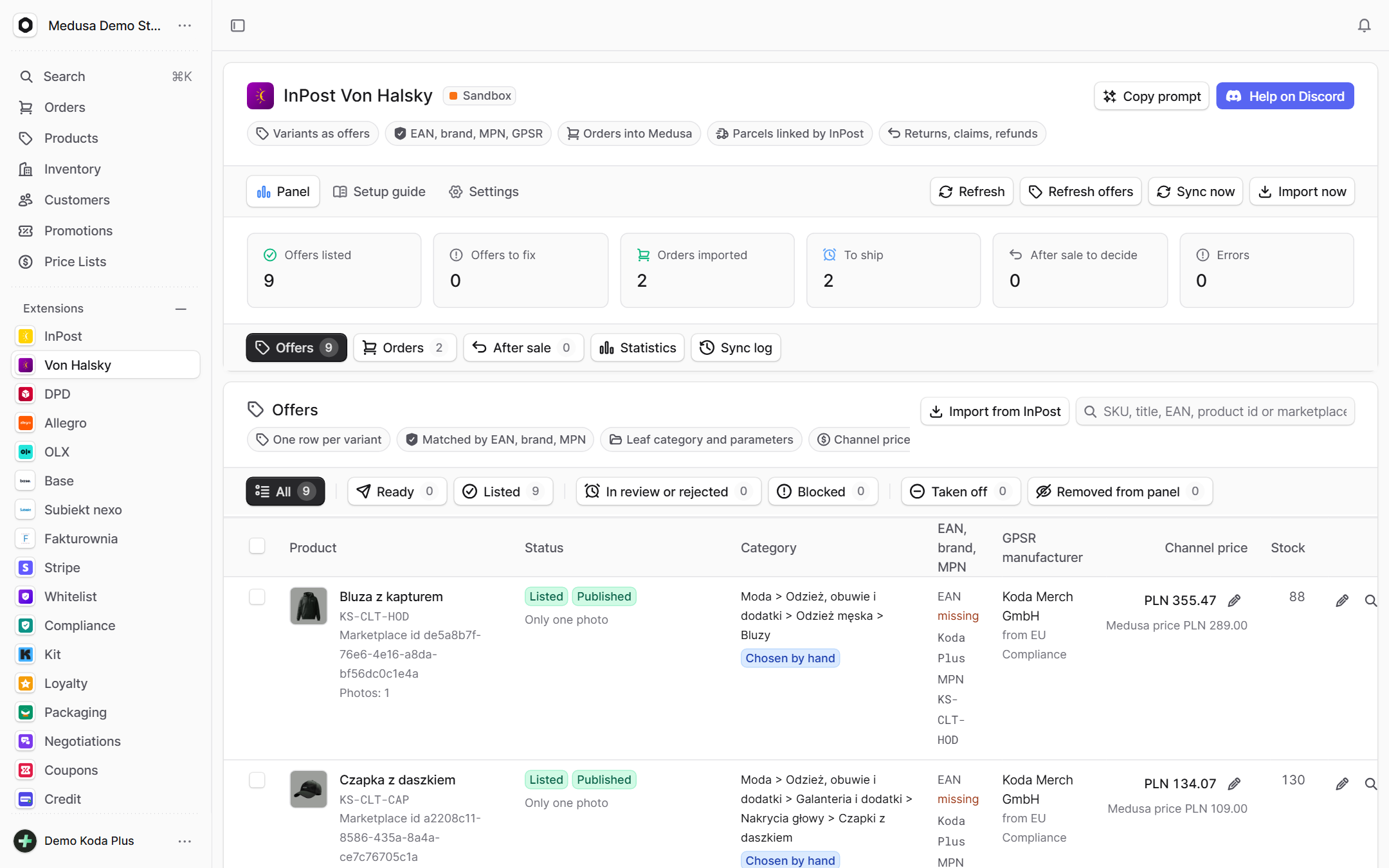
Von Halsky is InPost's marketplace inside the InPost Mobile app. The plugin lists products from your Medusa catalog there, keeps prices and stock in step, and brings orders from the app into Medusa as regular orders, each one exactly once. Returns, claims and the channel's results live in the same admin.
What exactly
this integration does
-
Products ready to list
Every variant becomes its own offer. The plugin gathers everything InPost asks for from Medusa: the EAN or the brand with the manufacturer part number, the description, up to 20 photos, dimensions and weight, the VAT rate and the manufacturer data for GPSR. If something is missing, the admin tells you exactly what before you try to list.
-
Categories without the busywork
Map a Medusa category to an InPost category once and all of its products follow. A single product can take a different one, or the one InPost suggests from its EAN. The category's required parameters are filled in right in the admin.
-
Prices and stock always current
List the offers you select with one click, and from then on every 5 minutes price and stock changes in Medusa reach InPost on their own. When an item sells out its offer closes, and it reopens when stock comes back. The price in the app is the Medusa price with VAT and your markup.
-
Orders in Medusa, never twice
Bring a paid order from the InPost app into Medusa with one click, or let it arrive every 5 minutes with automatic import on. It lands in its own sales channel, with stock reserved and the payment recorded, always exactly once. Ship the parcel in ShipX to the buyer's e-mail from the order, and InPost links it to the order itself.
-
Returns and claims in one place
Accept or reject a return, answer a claim and refund in full or in part, without switching to the InPost portal. The plugin fetches the buyer's contact details only for viewing and never stores them.
-
The channel's results
See what Von Halsky earns next to the rest of your sales: revenue, order count, average order value, offers that don't sell, the most common reasons offers are rejected, the time from payment to shipping, and returns and claims with their reasons.
How it guards
your data
-
Nothing happens without you
Listing, changing and closing offers, promotions, return decisions and refunds are always approved by a person. Only prices and stock go out on their own (you can turn that off), and automatic order import is off by default.
-
Credentials under lock
The app secret never shows in full in the admin, it is masked in logs and error messages, and access tokens are kept in memory only.
-
A lost connection shows at once
InPost switches off the offers of an integration that has lost its connection. So when InPost refuses the credentials twice in a row, the admin shows a red alert with the time and the reason.
-
Orders that can't be faked
A shopper in your store can't add fields to a cart or an account that would pass for a marketplace order. What came from InPost is decided by the plugin's own tables only.
Setup
in three steps
The full list of options, events and API routes is in the package README on GitHub.
Paste it into Claude Code, Cursor or another AI assistant in your Medusa project: it installs and configures the integration, with writes off.
- 1 Install the package from npm.
npm install @koda-plus/medusa-plugin-inpost-marketplace - 2 Add the plugin to medusa-config.ts.
const vonhalsky = { environment: process.env.VONHALSKY_ENV, // "sandbox" (default) or "live" sandbox: { clientId: process.env.VONHALSKY_SANDBOX_CLIENT_ID, clientSecret: process.env.VONHALSKY_SANDBOX_CLIENT_SECRET, organizationId: process.env.VONHALSKY_SANDBOX_ORGANIZATION_ID, }, live: { clientId: process.env.VONHALSKY_LIVE_CLIENT_ID, clientSecret: process.env.VONHALSKY_LIVE_CLIENT_SECRET, organizationId: process.env.VONHALSKY_LIVE_ORGANIZATION_ID, }, markupPercent: process.env.VONHALSKY_MARKUP_PERCENT, // the admin setting wins // syncPriceStock: true, // writer: price and stock of listed offers // demo: true, // a simulated marketplace, nothing sent to InPost } plugins: [{ resolve: "@koda-plus/medusa-plugin-inpost-marketplace", options: vonhalsky }] - 3 Run the migrations and open the integration in the Medusa admin.
npx medusa db:migrate
Other
integrations
- Allegro Offers, orders, stock and parcels
- Base Cards, stock, prices and orders both ways
- Subiekt nexo Orders as ZK, WZ and invoices with KSeF
- Fakturownia Invoices, corrections and KSeF exactly once
- InPost Parcel lockers, courier and COD on ShipX
- DPD DPD courier, Pickup points and COD on the DPD Polska API
- OLX Adverts that match the store's stock
- Stripe Volume, fees, disputes and account health
- Negotiations Target price, counter offer, acceptance
- Trade credit Limits, terms and customer balances
- Loyalty Points, a reward ladder and a ledger
- Coupons A three-step creator and the results of every coupon
- Packaging Piece, box, pallet, minimum and step
- EU compliance GPSR, RODO and Omnibus in one panel
- VAT whitelist NIP, VIES and REGON in one panel
- E-mails Ready templates in Polish and English
- Kit Store sign-ups straight onto your Kit newsletter list
- Tasks Tasks on orders, products and customers
Tell us about your project,
we'll tailor the rest to you
A 15-minute call is enough for us to know whether we are a fit for your project.
We start from what you need, not from an off-the-shelf solution.