
A task board
in Medusa
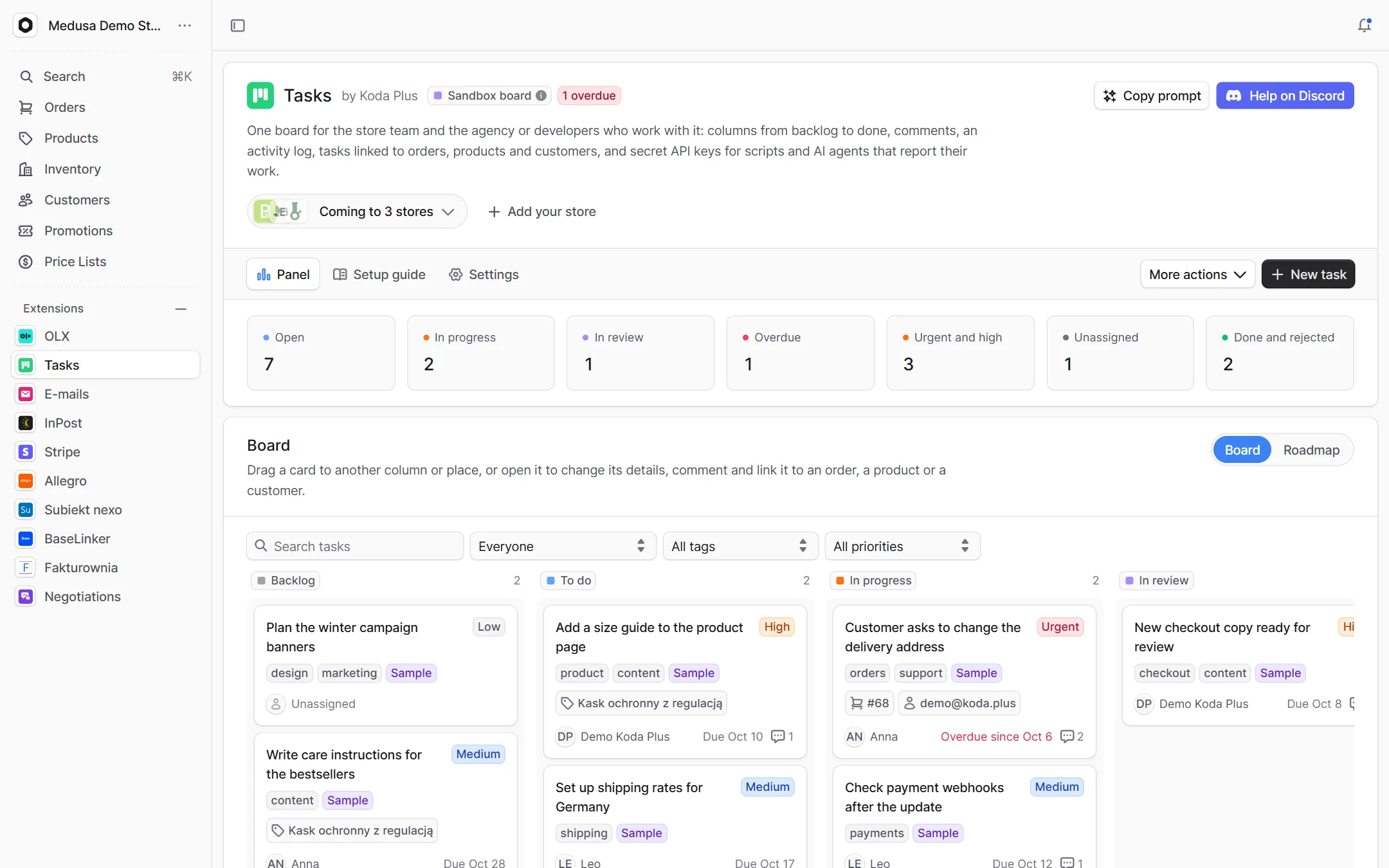
One board for the store team and its agency in the Medusa admin: columns from backlog to done, comments and a log of every change. Pin a task to an order, a product or a customer, and let scripts and AI agents report on the same board.
What exactly
this integration does
-
One board for everyone
Backlog, to do, in progress, in review, done and rejected, with priorities, assignees, due dates and tags. Drag a card between columns, open it to change anything, comment and link it.
-
Tasks on the store's records
Link a task to an order, a product or a customer. Their pages list the linked tasks and start a new one with the record already linked.
-
A plan for the months ahead
The roadmap view lays out the same tasks by due month, with progress and who does what.
-
Counters and filters
Open, in progress, in review, overdue, urgent and unassigned. The overdue, urgent and unassigned tiles filter the board, and filters work by text, assignee, tag and priority.
-
Scripts and AI agents on the team
A secret API key creates, moves and comments on tasks through the same routes as the board. The agent's comments carry the "AI agent" role and the name the request sends.
-
History and events
Who created, moved, assigned, commented and linked what, and when. Every change is a Medusa event, so the rest of your stack can react to it.
How it guards
your data
-
A sandbox for demo accounts
Accounts listed in sandboxAccounts see and change only the sample board, refreshed daily. A guessed task id from the real board ends in a 404.
-
Order without races
A dropped card names its new neighbours, and both columns are numbered again in one transaction under a lock of the board, so two people never scramble the order.
-
Links read live
A task stores the record's id only. The order number, the product title or the customer's name come from Medusa when shown, so nothing goes stale.
-
A takeover without losses
A store that ran the KODA Panel module gets its tasks, comments and history with the same ids and dates.
Setup
in three steps
The full list of options, events and API routes is in the package README on GitHub.
Paste it into Claude Code, Cursor or another AI assistant in your Medusa project: it installs and configures the integration, with writes off.
- 1 Install the package from npm.
npm install @koda-plus/medusa-plugin-tasks - 2 Add the plugin to medusa-config.ts.
plugins: [ { resolve: "@koda-plus/medusa-plugin-tasks", options: { // agencyAccounts: ["@twoja-agencja.pl"], }, }, ] - 3 Run the migrations and open the integration in the Medusa admin.
npx medusa db:migrate
Running for our clients
See our portfolio biolcheck

Other
integrations
- Allegro Offers, orders, stock and parcels
- BaseLinker Cards, stock, prices and orders both ways
- Subiekt nexo Orders as ZK, WZ and invoices with KSeF
- Fakturownia Invoices, corrections and KSeF exactly once
- InPost Parcel lockers, courier and COD on ShipX
- OLX Adverts that match the store's stock
- Stripe Volume, fees, disputes and account health
- Negotiations Target price, counter offer, acceptance
- Trade credit Limits, terms and customer balances
- Loyalty Points, a reward ladder and a ledger
- Packaging Piece, box, pallet, minimum and step
- EU compliance GPSR, RODO and Omnibus in one panel
- VAT whitelist NIP, VIES and REGON in one panel
- E-mails Ready templates in Polish and English
Tell us about your project,
we'll tailor the rest to you
A 15-minute call is enough for us to know whether we are a fit for your project.
We start from what you need, not from an off-the-shelf solution.