
Stripe, visible
in Medusa
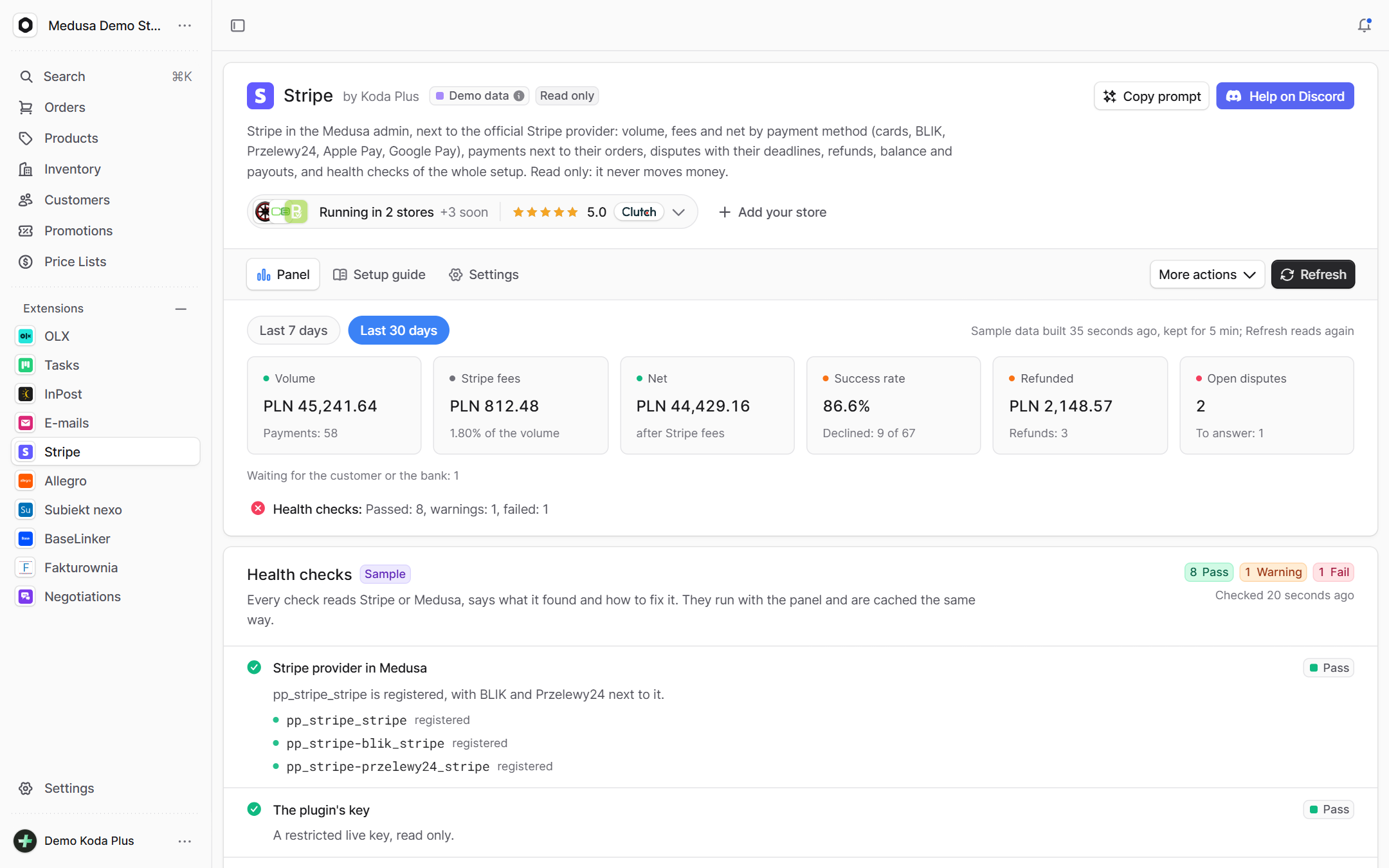
A Stripe dashboard in the Medusa admin: volume, fees and net by payment method, every payment next to its order, disputes with their evidence deadlines, refunds, the balance and payouts. Plus health checks of the whole setup with a fix for each problem. The official provider keeps taking payments – this plugin only reads.
What exactly
this integration does
-
A dashboard for 7 or 30 days
Volume, Stripe fees and net, the success rate, refunds and open disputes, then a table by method: cards, BLIK, Przelewy24, Apple Pay and Google Pay.
-
Payments next to orders
Every payment with its method, status, decline reason, Radar risk, fee and net, linked to the Medusa order and to the Stripe Dashboard. A payment whose cart never became an order glows red.
-
Health checks with a fix
The provider registered, the key, the account, the payment methods, the webhook with its last deliveries, the wallet domains, the capture mode – each checked, with a verdict and what to do.
-
Disputes with deadlines
Open disputes with the evidence deadline, the days left and the urgency, linked to the order and to the Dashboard where you answer them.
-
The order widget
The PaymentIntent behind the order's payment: status, method, amount, Stripe fee and net, exchange rate, Radar risk, refunds and disputes. After a capture or refund in Medusa the plugin reads Stripe again.
-
Read only by construction
The Stripe client has one method: a GET on a short list of paths. No code path can capture, refund or pay out – those stay in Medusa's order actions.
How it guards
your data
-
A read-only key
A restricted key (rk_live_…, Read or None per resource) is recommended. It only rides the Authorization header, is masked everywhere, and the admin sees just its kind and last four characters.
-
Gentle on Stripe's limits
It reads only when someone opens the page or clicks Refresh, never in the background. Reads are cached, ten admins at once mean one request, and a whole read has a 25 second budget.
-
Money in integers
Amounts stay in minor units as Stripe sends them; sums are integer sums per currency, never floats, and two currencies are never added together.
-
No key, no crash
Without a key the page shows the setup; a wrong key shows up as a failed check. The plugin never breaks the boot.
Setup
in three steps
The full list of options, events and API routes is in the package README on GitHub.
Paste it into Claude Code, Cursor or another AI assistant in your Medusa project: it installs and configures the integration, with writes off.
- 1 Install the package from npm.
npm install @koda-plus/medusa-plugin-stripe - 2 Add the plugin to medusa-config.ts.
plugins: [ { resolve: "@koda-plus/medusa-plugin-stripe", options: { apiKey: process.env.STRIPE_READ_KEY, // rk_live_..., Read or None per resource // demo: process.env.STRIPE_DEMO === "true", // sample data, no requests to Stripe // providerId: "stripe", // the id of the official provider entry // backendUrl: "https://api.example.pl", // when the admin runs on another address // storefrontDomains: ["example.pl", "www.example.pl"], // cacheSeconds: 300, }, }, ] - 3 Run the migrations and open the integration in the Medusa admin.
npx medusa db:migrate
Running for our clients
See our portfolio

 biolcheck



Other
integrations
- Allegro Offers, orders, stock and parcels
- BaseLinker Cards, stock, prices and orders both ways
- Subiekt nexo Orders as ZK, WZ and invoices with KSeF
- Fakturownia Invoices, corrections and KSeF exactly once
- InPost Parcel lockers, courier and COD on ShipX
- OLX Adverts that match the store's stock
- Negotiations Target price, counter offer, acceptance
- Trade credit Limits, terms and customer balances
- Loyalty Points, a reward ladder and a ledger
- Packaging Piece, box, pallet, minimum and step
- EU compliance GPSR, RODO and Omnibus in one panel
- VAT whitelist NIP, VIES and REGON in one panel
- E-mails Ready templates in Polish and English
- Tasks Tasks on orders, products and customers
Tell us about your project,
we'll tailor the rest to you
A 15-minute call is enough for us to know whether we are a fit for your project.
We start from what you need, not from an off-the-shelf solution.