Selected work

See the projects
working in practice

Every project means a different industry and a different challenge. Each time we match the solution to what you actually need.

E-commerce store

An e-commerce store for tyres and wheels

Over five thousand listings and no two the same: every tyre and rim carries its own year, tread depth and casting number, so the catalogue describes items rather than sizes on a shelf. Built on Medusa, with a search that picks wheels by car make and year, and one stock shared with Allegro and OLX.

  • Shopify (previously)
  • Medusa
  • Next.js
  • React
  • BaseLinker
  • Allegro
  • OLX
  • Railway
B2B and B2C platform

B2B and B2C platform for beauty salons

A store for a personalised skincare brand: salons order wholesale, customers buy retail, and every cream is composed from ingredients measured into single-use ampoules. Three languages and separate markets, where the country sets the currency and product availability.

  • Medusa
  • React
  • Algolia
  • Stripe
  • Przelewy24
  • Subiekt Nexo ERP
  • Fakturownia
Web application

Web application for insulation company Wekert

A website and an admin panel whose brain is the company knowledge base in Obsidian. Open technologies and AI agents mean the application can keep growing without a ceiling.

  • Next.js
  • React
  • Payload CMS
  • Google Ads
  • Obsidian Vault
  • Cloudflare
  • Railway
CRM system

A CRM for the insulation industry

A panel that runs an insulation company from a quote request on its website to the finished job: tracked offers with opens and a client score, a crew calendar, square metres converted into litres and spray cycles, and stock levels. Crews get the job card on their phones, and the office sees plan versus actual.

  • Next.js
  • React
  • PostgreSQL
  • Resend
  • Google Calendar
  • Task Planner
  • Railway
Coming soon
E-commerce store

E-commerce store for a body armour manufacturer

A catalogue of ballistic plates, inserts and vests alongside sections for the manufacturer's own testing laboratory, in four language versions.

  • Shopify
  • Storesynk
  • Webflow
  • Lenis
  • Figma
  • Cloudflare
Website

Website for 3D printing technology in space

A site for a company developing additive manufacturing for industry and for space. We laid the hard technology out as applications, a roadmap and concrete video material, so it holds up for an investor and an engineer alike.

  • Webflow
  • Figma
Website

Website for the Miro Development estate

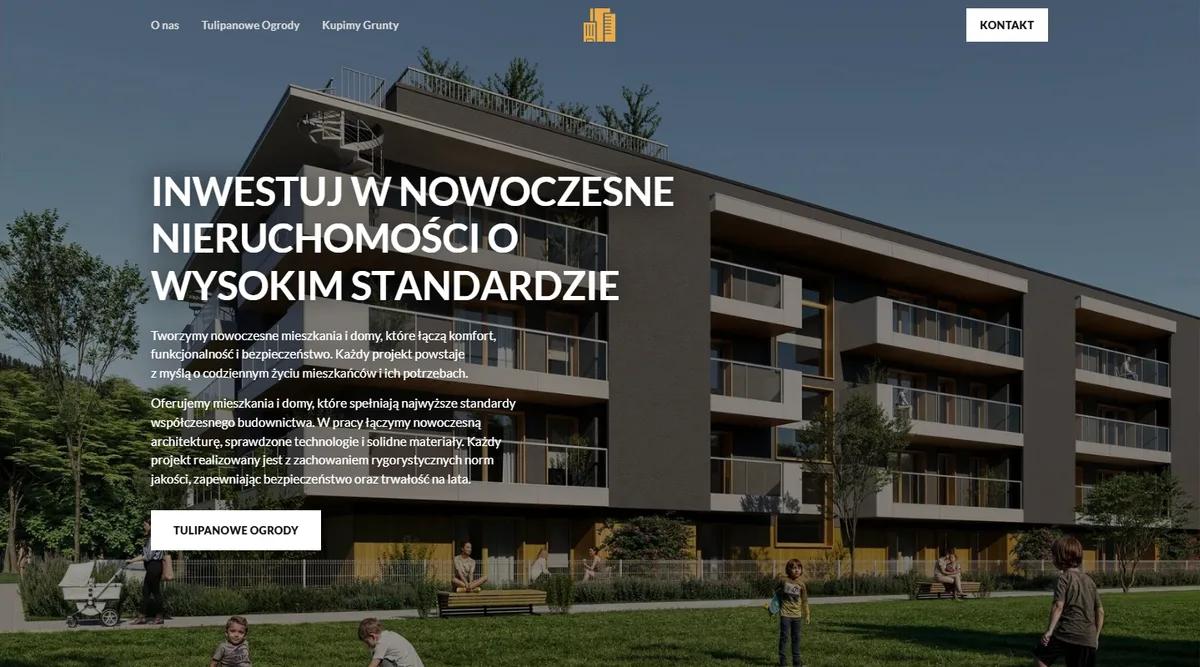
A site for a new housing development in Dzierżoniów. It opens with a ninety-second construction film rendered in Blender, from a meadow with a surveyor to finished homes at dusk, with captions for each stage. Then an availability map with unit outlines, a house card with floor plans and a contact form.

  • Blender 5.2
  • Higgsfield
  • Next.js
  • Payload CMS
  • Cloudflare
  • Railway
Coming soon
E-commerce store

E-commerce store with an AI customer service agent

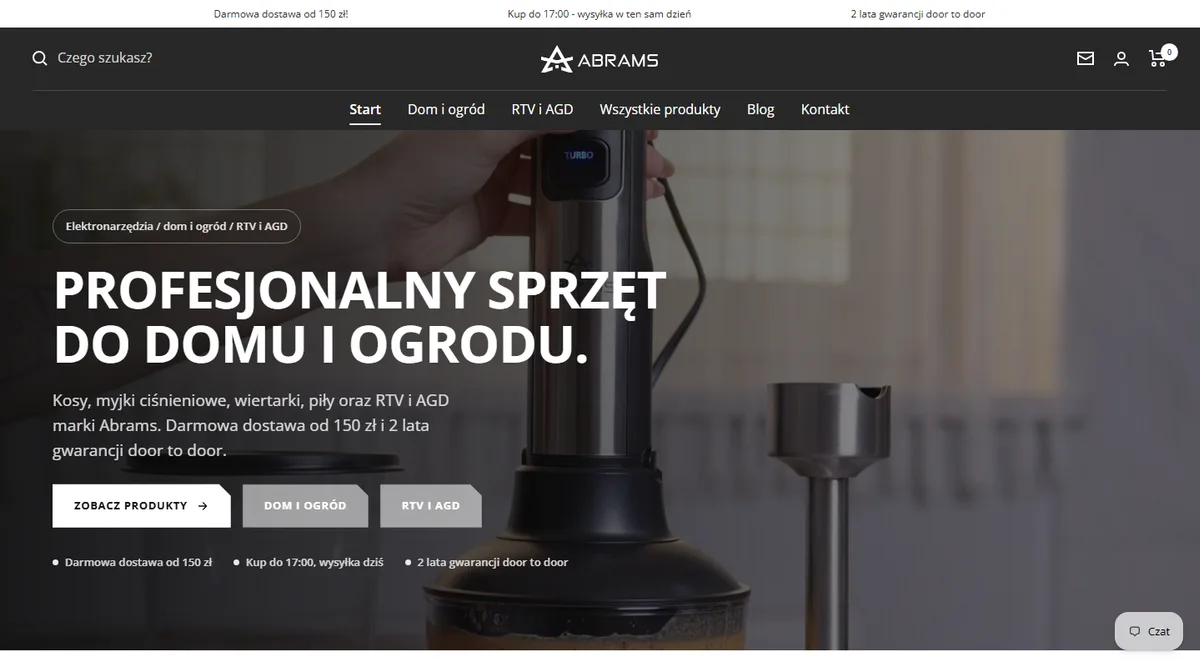
A catalogue of electronics, home appliances and garden products synced with the central warehouse, plus an omnichannel AI agent: it answers customers in the store and on Allegro, and hands the harder cases to the team.

  • Shopify
  • Allegro
  • BaseLinker
  • SellAssist
  • Chatbot AI
  • Claude API
  • Railway
Website

Two developments for Firma Inwestycyjna JW

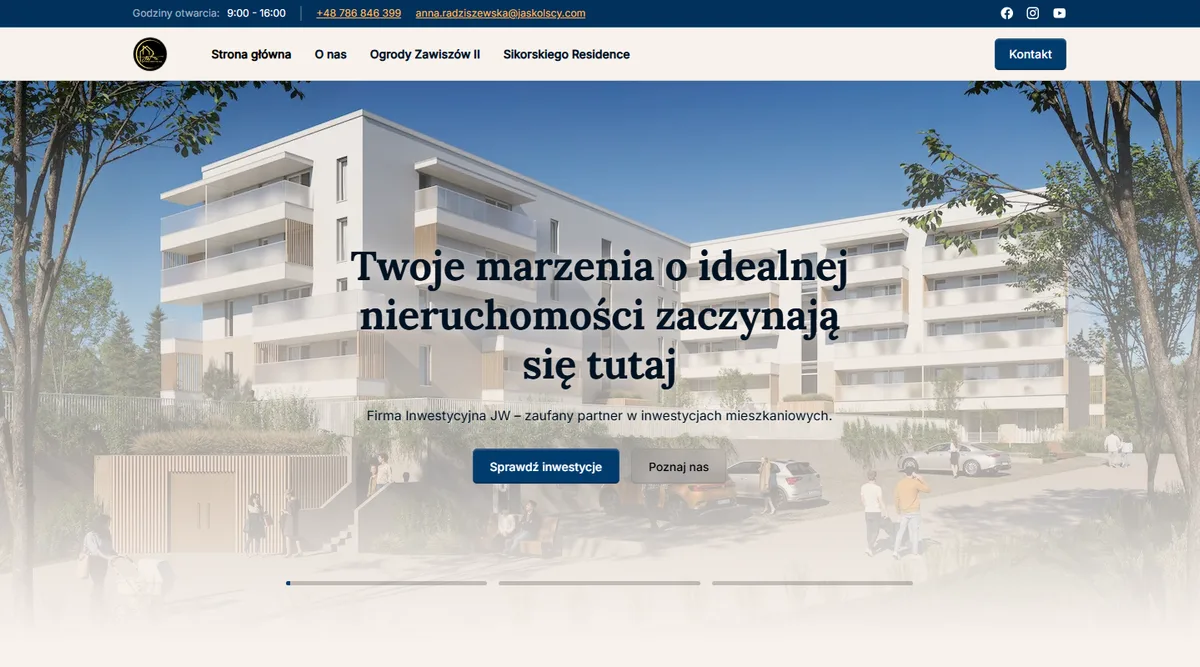
The whole site from scratch: two housing developments and 102 units with an interactive floor map, filtering by price, size and floor, and a card for every apartment. Price history feeds the public dane.gov.pl register daily.

  • Webflow
  • GSAP
  • Lottie
  • Supabase
  • dane.gov.pl
New WJ Investment website home page, desktop view
Website

Website and apartment catalogue for WJ Investment

The whole site from design to launch: a clickable floor map with 150 unit outlines coloured by sales status, and an apartment catalogue with filters. Prices refresh daily and feed the public dane.gov.pl register required by Polish price-transparency law.

  • Webflow
  • GSAP
  • Lottie
  • Supabase
  • dane.gov.pl
Coming soon 5.0 Review
Website

Website for a business training company

A site for trainers who work with sales forces and management teams. Training areas, the way a project runs, trainer profiles and an FAQ laid out so an HR team can size up the offer before picking up the phone.

  • Next.js
  • React
  • Tailwind
  • Vercel
Website

Website for the biggest Baltic wine festival

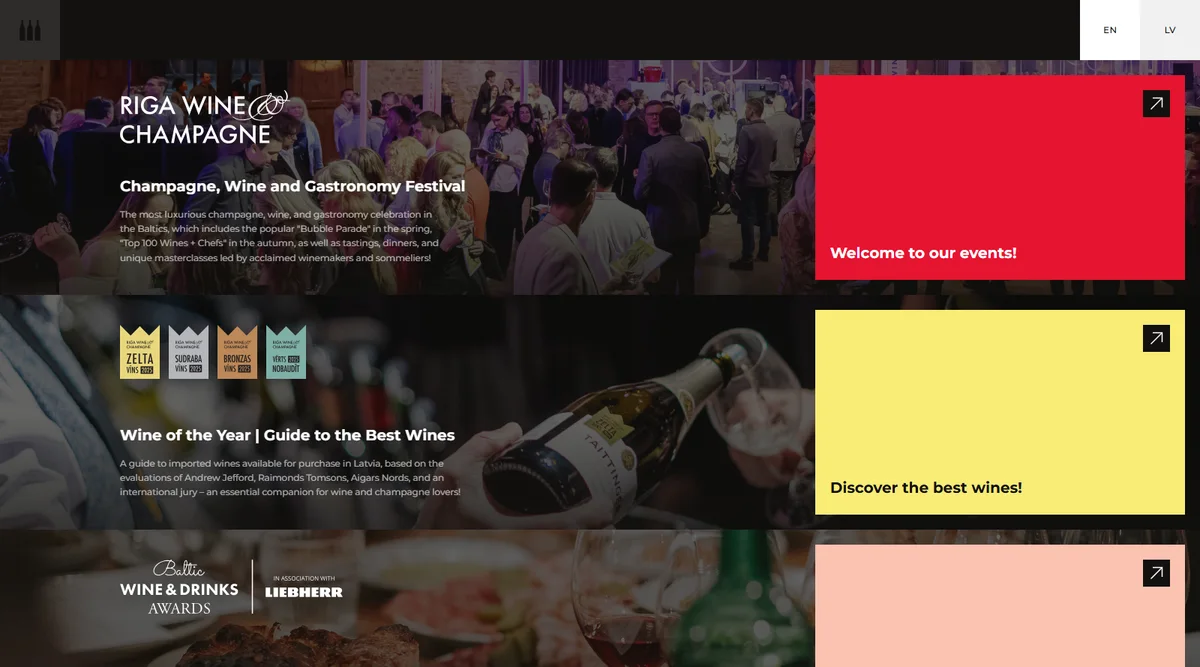
The site of the biggest wine festival in the Baltic states: the event programme, competition results and wine guides in one place.

  • Webflow
  • Splide
Website

PR agency website with a blog migration

A new agency site built in Webflow on the Lumos framework, together with moving the entire blog over from WordPress.

  • Webflow
  • Lumos
  • GSAP
  • Lottie
  • Swiper
Our own product

Koda Flow: laptop work on the move

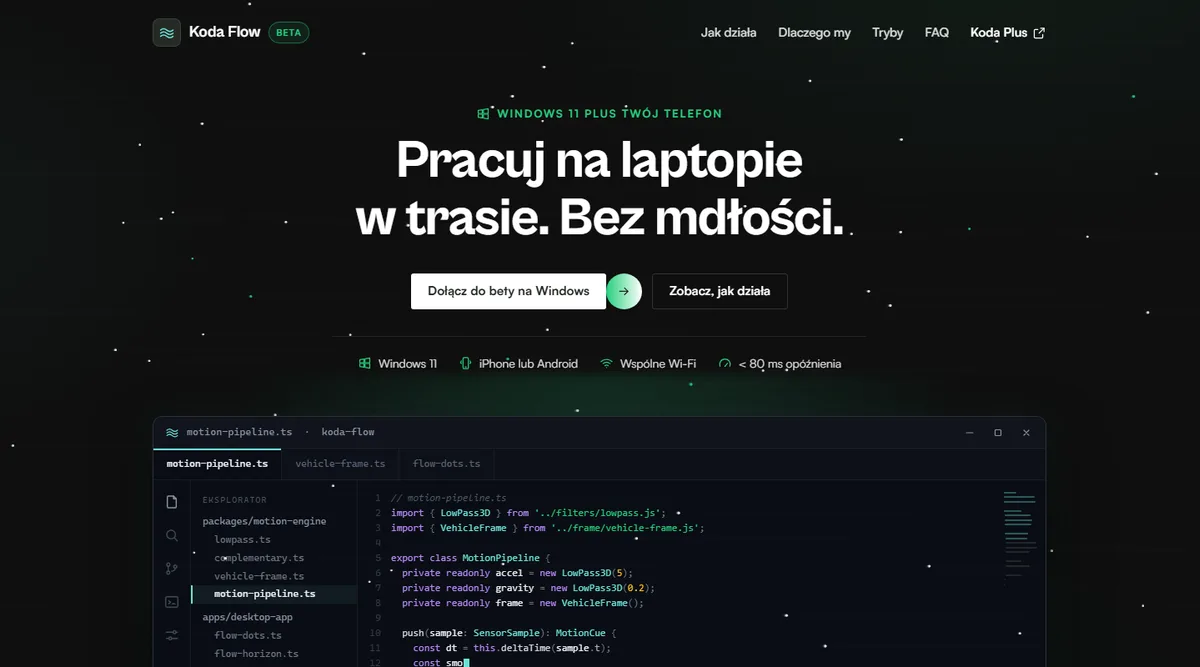
Our own product: a Windows overlay paired with your phone that reduces motion sickness while working in a car, train or bus. It reads the vehicle's movement from the phone's sensors. The desktop version is in beta, the mobile app is still in development.

  • Tauri
  • React

Project storyOpony Kola

A Medusa.js store for tyres and wheels: item-level catalogue, shared stock

We moved a tyre and wheel store from Shopify to Medusa.js, with a Next.js storefront. Each listing is a specific tyre, rim or set, and DOT year, tread depth, bolt pattern, offset and casting number are data fields behind the filters and product page. BaseLinker holds the stock shared by the store, Allegro and OLX, and syncs with Medusa both ways.

Why this stack

Medusa.js (in the KODA Vault knowledge base)
The catalogue describes specific pieces and sets, with parameters that vary by product type. Medusa keeps them as structured product data with our own admin form, and the BaseLinker integration, Omnibus price history and weight-based shipping are modules of the same backend.
Next.js (in the KODA Vault knowledge base)
The Next.js and React storefront builds its own catalogue index from Medusa data, so filters for bolt pattern, offset, DOT year and tread depth respond instantly without a separate search service. Middleware also redirects old Shopify URLs.
BaseLinker (in the KODA Vault knowledge base)
BaseLinker runs the stock and the Allegro and OLX sales, so the store syncs with it rather than keeping its own count. Our Medusa module queues operations, respects BaseLinker's API limits and logs every data exchange.
Allegro (in the KODA Vault knowledge base)
Tyre brands, tyre models and rim makers are suggested in the admin panel from Allegro category parameters, so product card values match listing parameters. Live listings are read on a schedule, and each item shows whether it is listed.
OLX (in the KODA Vault knowledge base)
Every item is unique, so it must never sell twice. OLX is connected to the same BaseLinker catalogue as Allegro, so the ad, the listing and the store share one stock figure, without a separate sync for each marketplace.
Railway (in the KODA Vault knowledge base)
The Medusa backend, the Next.js storefront, PostgreSQL and Redis run in one Railway project as always-on processes. Sync jobs run on a schedule, the storefront keeps the catalogue index in process memory, and Redis-backed events and workflows survive deploys.

What it means in practice

  • Shoppers filter by DOT year, tread depth, bolt pattern and offset, because each is a separate field on the listing, not part of the title.
  • A tyre sold on Allegro or OLX stops being available in the store within minutes, and nobody has to take it down by hand.
  • Staff add a new item in one admin form suited to its type, and its BaseLinker card is created at once with photos and parameters.
  • Old Shopify URLs, including those used in campaigns, 301-redirect to the right category with the filter kept.

Integrations and automations

  • Wheel fitment by car

    Makes, models, generations, years and factory wheel sizes come from the wheel-size.com database. The storefront fetches them through a caching server that translates model names into Polish and feeds the sizes straight into the catalogue filter.

  • Stock from BaseLinker

    Every few minutes a job reads the BaseLinker catalogue and writes stock differences into Medusa, matched by card ID. It adds back reservations for open orders, so a run never takes away items already set aside for an order.

  • Orders to BaseLinker

    A store order first lands in a queue in our database, then a Medusa workflow sends it to BaseLinker, so an outage there does not stop sales and an uncertain result creates no duplicate. Status and tracking number come back, and the tracking number triggers the dispatch email.

  • Nightly catalogue reconciliation

    Every night we compare both catalogues: stock, prices, SKUs and cards that have appeared or disappeared on the BaseLinker side. Mismatches land in the admin panel with a decision on each row, and prices are always approved by a person.

Project storyCrème Bar

B2B and B2C on one Medusa.js backend, in three languages

Wholesale orders from salons and retail sales for a personalised skincare brand run on one Medusa.js backend. The storefront is a separate React application, and the URL, such as /pl-pl or /de-de, selects the language and market. Payments, search and GUS company lookups also run on the backend, and order data reaches Subiekt nexo and Fakturownia automatically.

Why this stack

Medusa.js (in the KODA Vault knowledge base)
Salons and retail customers buy in the same store on different terms. In Medusa that means customer groups with their own price lists plus separate sales channels, and basket repricing after sign-in is our own workflow, with the platform core untouched.
React (in the KODA Vault knowledge base)
The store has several payment paths, a basket that checks stock as you shop and business accounts with their own prices. We built it in React with TanStack Router, with Medusa API data in a query cache that refreshes in the background.
Algolia (in the KODA Vault knowledge base)
The catalogue is in three languages, so each language has its own Algolia index, with typo-tolerant search. Products reach the indexes automatically when they change in Medusa, and queries go through the backend, which picks the index by page language.
Stripe (in the KODA Vault knowledge base)
Stripe handles payments in every market the store serves, euros included. We connected it through Medusa's payment module with Payment Element at checkout, and if a customer never returns from the bank, a Stripe webhook still completes the order.
Przelewy24 (in the KODA Vault knowledge base)
Przelewy24 gives Polish customers BLIK and online or traditional transfers. We added it as a second payment provider in Medusa: the backend creates the order when Przelewy24 sends its notification, and the return page waits and checks the transaction status if needed.

What it means in practice

  • Catalogue, orders and customers from both channels sit in one Medusa admin, so there is no separate shop and wholesale site to run.
  • A salon signs in to the same store as retail customers, and the basket reprices straight away to the prices on its account.
  • Descriptions in three languages and prices in zloty and euros are held in one backend, so no market needs its own copy of the catalogue.
  • Orders do not depend on customers returning from the payment gateway: the backend confirms payment and the store creates no duplicates.

Integrations and automations

  • Company data from GUS

    Opening a business account only takes the Polish tax ID: the backend queries the GUS REGON registry and fills in the company name and address on the form.

  • Stock checks in the basket

    Every minute, and whenever the customer returns to the tab, the basket checks availability with the backend. If stock has changed since an item was added, the store flags it before payment and suggests new quantities.

  • Stock and orders with Subiekt nexo

    Stock levels from Subiekt nexo reach Medusa on a regular schedule, and orders from the store are created in Subiekt as documents. The two systems are linked by a .NET service built on Subiekt's official SDK.

  • Documents in Fakturownia

    We connected Fakturownia as a Medusa module: a document with the buyer's details, including the tax ID, is issued automatically when an order changes status.

Project storyWekert

Company website and admin panel in a single Next.js application

The insulation company's public website and its admin panel run in one Next.js application. Quote requests, blog posts, offers and notes all go into the same PostgreSQL database the panel works from.

Why this stack

Next.js (in the KODA Vault knowledge base)
Service pages are prerendered, while the blog and the panel render per request because they read from the database. Next.js sets that mode route by route, so the website and the panel fit in one codebase.
React (in the KODA Vault knowledge base)
The panel holds a lot of browser state: a blog post editor, a drag-and-drop task planner and live-edited notes. Each view is a React component in the same application, so a new module uses the existing database and sign-in.
Obsidian Vault (in the KODA Vault knowledge base)
We modelled the panel's notes on Obsidian: a folder tree, lightweight markdown syntax and a live editor. A checkbox typed into a note appears as a planner task, so notes and tasks do not need two separate tools.
Google Ads (in the KODA Vault knowledge base)
The panel pulls campaign results from the Google Ads API, read-only, and shows them next to the website's enquiries. A set of rules turns metrics into short recommendations, such as flagging a campaign that spends without converting.
Railway (in the KODA Vault knowledge base)
Rendering PDFs in headless Chromium needs extra system libraries, and webhooks need somewhere to land at any hour. Railway runs the application as a continuous process next to its PostgreSQL database and deploys every change merged into the main branch.

What it means in practice

  • Enquiries, offers, notes and tasks live in one panel, and global search finds a phrase across all of them at once.
  • The full application code sits in the company's own repository, so the panel grows without an off-the-shelf platform's licences and limits.
  • The site admits search and AI crawlers and carries structured data and an llms.txt file, so AI assistants get a clear account of the company's services.

Integrations and automations

  • Quote form enquiries

    Each submission is saved to the panel inbox, and Resend sends a notification to the company and an automatic reply to the customer when they leave an email address.

  • PDF offers with delivery status

    The panel renders the offer letter to PDF in headless Chromium and sends it through Resend, and a webhook records against the offer whether the email was delivered.

  • SEO and AEO audit in the panel

    The panel fetches its own pages over HTTP, the way a crawler does, and checks metadata, structured data and llms.txt. It turns the results into a list of recommended fixes.

Project storyAstriva

A Webflow site and Shopify sales, joined by Storesynk

We built the body armour manufacturer's website in Webflow and put sales, checkout and customer accounts on Shopify. Storesynk joins the two: the Shopify catalogue feeds Webflow CMS collections, while the basket and customer account work right on the page, in all four language versions.

Why this stack

Webflow (in the KODA Vault knowledge base)
Alongside the catalogue, the site has extensive sections on the laboratory, research services, and reports and certifications. In Webflow the catalogue and this content live in one project, and the language versions sit in subfolders with hreflang tags.
Shopify (in the KODA Vault knowledge base)
Shopify is the source of products, prices and orders. Checkout runs on the checkout.astriva.pl subdomain, so buyers stay on the brand's domain throughout.
Storesynk (in the KODA Vault knowledge base)
Storesynk (formerly Shopyflow) brings Shopify products into Webflow CMS collections and adds variants, basket, discount codes, search and the customer account to the pages, without embedding off-the-shelf widgets. We are listed among Storesynk Experts.
Cloudflare (in the KODA Vault knowledge base)
Webflow publishes the site through the Cloudflare network, so catalogue pages and laboratory sections reach visitors from cache as ready-made HTML. The parts that must stay current (basket, customer account and price) are fetched from Shopify in the browser.

What it means in practice

  • Products and prices sit in the HTML of the store pages, so search engines and AI models see the catalogue without running JavaScript.
  • Products and prices are edited only in Shopify, and the Webflow catalogue pages take them from there.
  • Customers log in on the brand's site and check their orders there instead of going to a separate portal.
  • Laboratory and research content grows in Webflow independently of the catalogue, leaving the store's configuration untouched.

Integrations and automations

  • Shopify catalogue sync

    Products from Shopify flow into Webflow CMS collections, which generate the product pages.

  • On-page basket, Shopify checkout

    Choosing a variant and adding to the basket happen on the product page, while quantity and discount codes are handled in the basket panel. Shopify checkout completes the order on the brand's domain.

  • Accounts and order history

    Login, the order list with number, date, total, payment and fulfilment status, and the customer's addresses come from Shopify and are displayed in a Webflow template.

  • Search in the navigation

    The search in the menu suggests products with an image and price on every page of the site, with no separate results page to open.

Project storySpaceForm

A one-page website designed in Figma and assembled from Webflow components

The site for a company developing additive manufacturing for industry and space is a single scrolling page in English, which we designed in Figma and built in Webflow. The technology, applications, roadmap, team and FAQ sections are made of Webflow components with variants, and the video sits in the site's own assets and plays in a lightbox on the page.

Why this stack

Webflow (in the KODA Vault knowledge base)
Roadmap stages are tied to years, so that section, like the FAQ and the partner list, will need updating. Webflow publishes such changes straight from its editor and serves the video file from the same CDN as the rest of the site.
Figma (in the KODA Vault knowledge base)
The page is read by investors and engineers alike, so we settled the section layout in Figma before building. The repeating text-and-image block became a single Webflow component with an image-left or image-right variant.

What it means in practice

  • A roadmap date, an FAQ answer or an application description is changed in Webflow and published with no code deployment.
  • The video loads only on click and plays in a lightbox on the page, so it does not slow the first view or send visitors elsewhere.
  • New sections are assembled from existing components, so they keep the spacing and typography of the design.

Project storyAbrams

A Shopify store with an AI customer service agent built on the Claude API

Alongside a Shopify store selling consumer electronics, home appliances and garden products, we launched a separate service for an AI customer service agent. The agent has a single core on the Claude API and uses the same knowledge base and tools in the store and on Allegro.

Why this stack

Shopify (in the KODA Vault knowledge base)
Shopify runs the catalogue, checkout and orders. We extended the theme with our own blocks: technical details from metafields in accordions, a “Buy now” button that goes straight to checkout, and a compact strip with shipping, warranty and returns terms.
Claude API (in the KODA Vault knowledge base)
The agent runs a tool-use loop: the model decides whether to search the knowledge base, look up an order or hand the case to the team. It answers from the store's written policies and tool results, not from what the model remembers from training.
Allegro (in the KODA Vault knowledge base)
Allegro buyers reach the same agent as store customers. Delivery and returns policies are therefore written once, and each handed-over case records its channel so the team knows where the question came from.
BaseLinker (in the KODA Vault knowledge base)
BaseLinker syncs the store's catalogue with the central warehouse, so Shopify works from the same product data as the warehouse.
Sellasist (in the KODA Vault knowledge base)
Orders and shipments for the store are handled in Sellasist. The agent performs no operations there, and cases that need action on an order, such as a refund or a complaint, go to the team.
Railway (in the KODA Vault knowledge base)
The agent hub is a Next.js application with a PostgreSQL database for handed-over cases and an event log, plus a team panel behind a login. Railway runs it as one long-lived server rather than a set of on-demand functions.

What it means in practice

  • Customers asking about delivery, payments, returns, complaints or invoices get answers that follow the store's written policies.
  • Customers can ask about order, payment and delivery status in the conversation, and the agent only gives the data Shopify returns.
  • The agent changes nothing in the store: refunds, issuing invoices and accepting a complaint always need a human decision.
  • Each handed-over case reaches the team with a summary, the reason and any recommendation, so it is clear at once what it is about.

Integrations and automations

  • Answers from the knowledge base

    The store's policies are kept as notes that the agent searches before it answers. If a topic is not covered, it does not guess but hands the case to the team.

  • Order lookup in Shopify

    Using the email address from the order, the agent pulls the order number, payment and fulfilment status and the tracking link from the Shopify Admin API. Access is read-only.

  • Handover to the team

    Each escalation is saved to a decision queue with its reason and the channel it came from, and written to an event log, so every handover can be traced later.

Project storyFirma Inwestycyjna JW

Two housing developments on shared Webflow CMS templates

One Webflow site holds two housing developments by Firma Inwestycyjna JW, with 102 units between them. Development pages and apartment cards share CMS templates, and the Supabase price history and the daily dane.gov.pl dataset cover both developments at once.

Why this stack

Webflow (in the KODA Vault knowledge base)
Both developments share one page template and one apartment card template in Webflow CMS, so another development means new collection items, not pages built from scratch. Unit outlines on the floor maps take their colour from the status in the CMS item.
Supabase (in the KODA Vault knowledge base)
With two developments, parking spaces and storage rooms must land on the right development's cards. The XML file in Supabase Storage carries each item's price history, which the CMS does not store, along with the development name.
dane.gov.pl (in the KODA Vault knowledge base)
The portal can import datasets on its own from a description in its harvester format. One such description, served at a fixed address, lists the daily CSV files with prices for both developments, and dane.gov.pl fetches it automatically once a day.
Lottie
The looping icons on the home page are Lottie animations, played by Webflow's built-in Lottie element.

What it means in practice

  • Both developments share one layout and one set of filters (price, size, rooms, floor), so apartments from either scheme are easy to compare.
  • Every apartment has its own page with a floor plan, specifications, prospectus and price history, so a link to one unit is easy to share.
  • Prices for both developments reach dane.gov.pl every day, with nothing to upload to the portal.

Integrations and automations

  • One price file for both schemes

    Every day an XML file covering both developments lands in Supabase Storage, with the status, current price and price history of apartments, parking spaces and storage rooms.

  • Price history split by development

    The apartment card script finds the unit by its CMS item ID, then picks parking spaces and storage rooms by the development name stored in the file.

Project storyWJ Investment

A Webflow CMS floor map with price history in Supabase

WJ Investment's floor map, unit catalogue and listing pages are generated from Webflow CMS collections. The price history the CMS cannot hold sits alongside, in a daily XML file in Supabase that the listing pages read with a script. The same prices feed the dane.gov.pl register every day.

Why this stack

Webflow (in the KODA Vault knowledge base)
The floor map is a Webflow CMS collection list: each unit outline is an item whose status goes into an SVG attribute that sets the colour. Changing the status in the editor repaints the map without touching the artwork.
Supabase (in the KODA Vault knowledge base)
The law requires a visible history of price changes, but a CMS price field only holds today's value. Each unit's dated price history lives in an XML file in Supabase Storage, keyed to its Webflow CMS item ID.
dane.gov.pl (in the KODA Vault knowledge base)
Prices in the register must be refreshed daily, so nobody uploads files there by hand. The dane.gov.pl resource points to a fixed address on the developer's domain that always holds the current dataset.
GSAP (in the KODA Vault knowledge base)
Headings are split into words, and a GSAP timeline rotates them into place one by one as they enter the viewport. ScrollTrigger resets the animation once a heading drops below the bottom of the screen, so it plays again on every return.
Lottie
The home page icons are Lottie animations. Webflow's Lottie element can be driven from the interactions panel, so we set up icon playback there, with no script to write.

What it means in practice

  • The floor map shows at a glance which units are available, which are reserved and which are no longer on offer.
  • The catalogue filters instantly by price and size range, floor and rooms, and sorts by price, price per square metre or size.
  • Each listing shows the price history of the apartment and the parking spaces, with the period each price applied, as the price transparency law requires.

Integrations and automations

  • Daily price file

    Every day an XML file lands in Supabase Storage with the status, current price and full price history of apartments and parking spaces.

  • History table on the listing page

    A script on the listing page fetches the previous day's file, finds the unit by its CMS item ID and works out from the change dates how long each price applied.

  • Dataset for dane.gov.pl

    The dataset description, in the dane.gov.pl harvester format, is updated daily and lists the daily CSV price files in the column layout set out for developers.

Project storyAMARACH TIM

A static website in Next.js and Tailwind, served from Vercel

Next.js prerenders the training company's one-page website to static HTML, which we serve from Vercel. The company description, how an engagement runs and the trainer profiles are there from the first load, and only the interactive parts run in the browser: the fit questionnaire, training area tabs, expandable FAQ and contact window.

Why this stack

Next.js (in the KODA Vault knowledge base)
The content is the same for every visitor, so Next.js builds the page ahead of time along with the sitemap, robots.txt and the company's structured data. Crawlers read the process description and trainer profiles without waiting for JavaScript.
React (in the KODA Vault knowledge base)
The fit questionnaire is a React component that puts together a summary in the browser after the last answer, so the site runs without a backend or database.
Tailwind CSS
The brand's colours and fonts are defined once in the Tailwind theme and used as classes in every component, so training area cards, trainer profiles and FAQ items share one look.
Vercel (in the KODA Vault knowledge base)
Vercel deploys Next.js with no extra configuration and serves the prerendered page from its edge cache, so there is no server of our own to maintain.

What it means in practice

  • Training areas, how an engagement runs, trainer profiles and the FAQ sit on one scrolling page, with navigation that jumps straight to each section.
  • Getting in touch takes one click: a window with a phone number and an email link that opens a message with the subject filled in.
  • The site stores no visitor data, and questionnaire answers never leave the browser.

Project storyRiga Wine & Champagne

Bilingual wine festival site on Webflow CMS with a wine catalogue and venue map

We built a Webflow site for the festival where the event programme, competition results and the wine and venue guides are CMS collections in English and Latvian. One entry feeds a list, its own page and its structured data, and we wired tickets, a map and galleries into the same collections.

Why this stack

Webflow (in the KODA Vault knowledge base)
Most of the site is repeating entries: wines with country, colour, style and price, venues with address and awards, events with dates. CMS collections hold those fields, and Webflow Localization serves Latvian versions of the same entries under /lv/.
Splide
The venue and competition photo galleries and the upcoming event cards are CMS lists, which Webflow's built-in slider cannot handle. Splide mounts on their markup with custom buttons, and with a single photo the script turns off dragging and hides navigation.

What it means in practice

  • A new wine, venue or event is a single CMS entry, and the list, its page and the structured data all draw on it.
  • The Latvian and English versions show the same catalogue, with month names in dates matching the page language.
  • Visitors narrow the wine list by country, colour, style, price and alcohol content, or search by name, without reloading the page.

Integrations and automations

  • Ticket availability from Fienta

    Each event in the CMS links to its tickets on Fienta. The Fienta widget reports how many tickets are left, and the page shows a buy button or a sold-out notice on its own.

  • Wine catalogue filters

    Finsweet Attributes filters the CMS list by wine fields, with range sliders for price and alcohol, search by name and a load-more button. Paginated pages get a parameter-free canonical and noindex.

  • Venue map in Mapbox

    The list of awarded venues can be switched to a map, with markers placed from coordinates stored in the CMS entries. Mapbox loads only after that switch, so it adds nothing to the first page load.

  • Schema.org from CMS fields

    Wine, venue and event pages output Product, LocalBusiness and Event structured data from collection fields: award, country, coordinates and dates.

Project storySolski Communications

PR agency website in Webflow and Lumos, with the blog moved from WordPress

We moved the PR agency's WordPress blog into a new Polish and English site in Webflow, built on the Lumos framework. Old post and category addresses lead to their new equivalents through 301 redirects, and we added the news slider and the contact form in code.

Why this stack

Webflow (in the KODA Vault knowledge base)
Posts are the core content here, so the site needed a CMS with news sections, pagination and search, where an article goes live without a developer. Webflow Localization runs Polish and English versions of each post under separately translated URLs.
Lumos
The site has many page types in two languages. Lumos provides utility classes and variables for section spacing, buttons and columns, and pages are assembled from the same global components and their variants instead of styling each section separately.
GSAP (in the KODA Vault knowledge base)
The line next to each section heading grows as the section scrolls into view. It is one Webflow interaction on GSAP and ScrollTrigger, bound to a class site-wide, so it works on every page without custom animation code.
Swiper
The home page news slider shows posts from the collection, and Webflow's built-in slider does not work with CMS lists. Swiper mounts directly on that list and handles dragging, horizontal wheel or trackpad gestures and the keyboard.

What it means in practice

  • Old links to posts from search results and other sites do not break. They lead to the same article or to the news section.
  • Current news, media coverage and reports have separate paginated sections, and site search covers the whole website.
  • Polish and English versions of a post have their own URLs linked through hreflang, which helps Google show readers the right language.

Integrations and automations

  • 301 redirects from old addresses

    Migrated WordPress posts keep their slugs under /post/, and the old categories, the clients page and the English about page lead to their new equivalents.

  • Contact form via Formspark

    The contact form sends enquiries to Formspark after a Botpoison check and shows the sending, success or error state in place.

Project storyKoda Flow

A Tauri and React overlay for Windows, driven by phone sensors

Koda Flow is our own product for laptop work on the move: a Windows overlay that draws subtle on-screen cues matched to the vehicle's movement. Laptops rarely have motion sensors, so a paired phone streams its readings over local Wi-Fi. The motion maths lives in a separate TypeScript package, independent of windows and networking.

Why this stack

Tauri
The overlay is a transparent, always-on-top window that lets clicks pass through to the apps beneath it, one on each monitor. Tauri supports such windows natively, and its Rust layer runs the WebSocket server that receives motion from the phone.
React (in the KODA Vault knowledge base)
The control panel and overlay windows are built in React, but the cues are drawn on a canvas outside the component render cycle. As the panel and overlay are separate windows, moving a settings slider does not disrupt the drawing loop.

What it means in practice

  • The overlay lets clicks through and does not steal focus, so work in the apps beneath carries on as usual, across several monitors too.
  • The laptop needs no accelerometer or gyroscope: a phone and a shared Wi-Fi network, even a hotspot, are enough.
  • Sensor data travels straight from the phone to the laptop over the local network, with no account, cloud or server in between.
  • Cue mode, sensitivity, strength and opacity are set in the panel, the overlay responds straight away, and the settings stay for the next journey.

Integrations and automations

  • QR code pairing

    The laptop app shows a QR code carrying its local network address and a single-use token that expires quickly. Generating a new code revokes the previous one, so only one valid code is ever in circulation.

  • Motion stream over WebSocket

    The phone sends accelerometer and gyroscope samples in batches to a server inside the desktop app, which accepts data only from the paired device and passes it on to the overlay windows.

  • Vehicle motion processing

    The engine smooths the readings, separates gravity from acceleration and maps movement onto the vehicle's axes: sideways, lengthways and vertical. Its output depends only on the readings, not the system clock, so we test it on synthetic data such as standing still, braking and a sideways push.

See what we build
in a minute and a half

Free 15-minute call

Tell us about your project,
we'll tailor the rest to you

A 15-minute call is enough for us to know whether we are a fit for your project.
We start from what you need, not from an off-the-shelf solution.

See our demo

Contact us

Remigiusz in a navy shirt and glasses
I use iMessage I use WhatsApp
Adrian in a grey turtleneck and glasses
I use iMessage I use WhatsApp